5 min read
We moved our support into the tool we already had.
At Brault, support lived in a third-party tool. Now it runs on our own platform: AI drafts, people reply. How it works, and what to take from it.

In our support, no email reaches a customer until a person changes a page's status. The AI proposes a draft, someone writes the reply, and only when that person moves it to "Ready to send" does the email go out.
Until recently we tracked support requests in a third-party tool. Now they live on a Brault board, connected to email. Brault is the platform we're building: we made it to store and organize creative files, and we adapted it to run a kanban of support tickets. So this isn't a client story: it's our own support. For the customer, it's still just email. For us, everything happens in one place.
Why we did it
There was no fire to put out. We get a handful of requests a week, mostly suggestions for improving workflows, and two or three of us answer them. Whoever sees it first replies, and it has always been within 24 hours. That hasn't changed.
We did it for two reasons. First, we're building a platform meant to bring a team's work together, and it made no sense for our own support to live in another tool. Second, we wanted to put Brault's public API through a real use case before recommending it to anyone.
How it works
- A customer sends a request through the app's support form, and a page is created in the "New" state with the details. In Brault a page is a file of its own, a document you write in and comment on, so the whole ticket lives inside it.
- The page comes with an AI-suggested reply. It's a draft, not the answer.
- Whoever picks it up writes the reply as a comment, in the page's feedback section.
- When it's ready, they move the page to "Ready to send". An n8n automation emails the customer and leaves the page on "Answered".
- If the customer answers in that same thread, their email comes back to the page, the AI suggests a fresh reply, and the page returns to "New". The loop repeats as many times as needed, and the whole exchange stays on that one page.
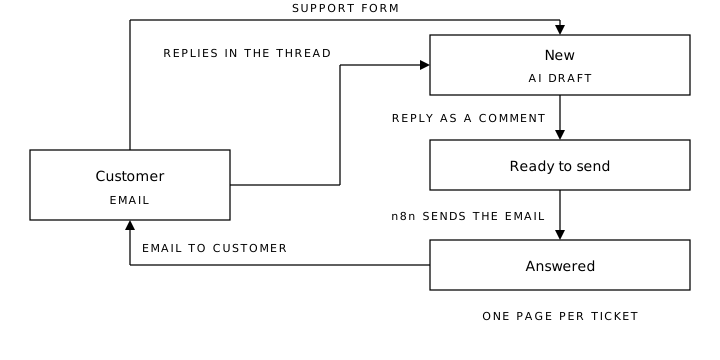
You end up with two threads telling the same story: an email thread on the customer's side, and a comment thread on the page on ours.
What it solves
Nobody replies blind. If two people pick up the same request, each can see what the other said and what the customer answered, without forwarding emails or asking in chat.
The history sits with the request. No digging through an inbox for what was said: it's on the page, along with its status.
One tool fewer. What used to sit outside is now where we already work.
None of this is spectacular, and that's exactly the point: a small process, done properly, with what was already there.
Why the AI drafts and doesn't reply
The suggested reply saves starting from a blank sheet. But no email goes out on its own: it goes out when a person writes the comment and changes the page's status. That status change is the sign-off.
It's the same rule I wrote about AI in a small business: it's good for drafts, in tasks where someone reviews the result. A reply to a customer is exactly that.
What makes it possible
Brault has a public API (opens in a new tab): a documented way for other tools to read and change what's inside. It also has signed webhooks, which are notices Brault sends to another tool when something changes, like a page moving to a new status.
That means any automation tool that can call an API can connect. n8n already has a native Brault node, and it's what we use. Zapier and Make are on the way.
From storing files to running a process
This is the use case we most want to show. Brault was built to store, organize and share creative files. With boards, pages and the API, the same tool ended up running a kanban of support tickets, which isn't what we had in mind when we designed it.
And it isn't the only thing that fits. An approval flow, a production schedule or tracking a campaign are the same idea: a board with statuses, and an automation that speaks up when something moves.
What you can use even without Brault
Before paying for another tool to get something organized, ask yourself three questions.
Can what you already pay for be connected? Plenty of tools have an API or connect through n8n, Zapier or Make. If the one you use every day allows it, you may not need another. It's the same logic as buying the standard parts and building only what's yours.
Is the process clear? Ours could be automated because it's simple: a request comes in, someone replies, an email goes out. If nobody on your side knows who answers or when, automating it won't bring order. It'll just speed up the mess.
Where does a person check? If the automation talks to a customer, there has to be a step where someone reviews it before it goes out.
If you have a process scattered across emails, spreadsheets and chats, and want to see whether it can run on what you already use, let's talk. No cost.